Responding to a Service Request by Telephone (IVR System)
- Chellie Esters
- Anastasia Medovkina (Deactivated)
The option to accept and decline service requests by telephone is available depending on the client's preference, and also based on the category of the Work Order.
Only Work Orders in the Open status can be accepted or declined.
Before calling into the IVR System, be sure to have the following information (found in the service request email):
IVR phone number
IVR pin number
Tracking number, Work Order number or Service ID
Accepting Maintenance Work Orders
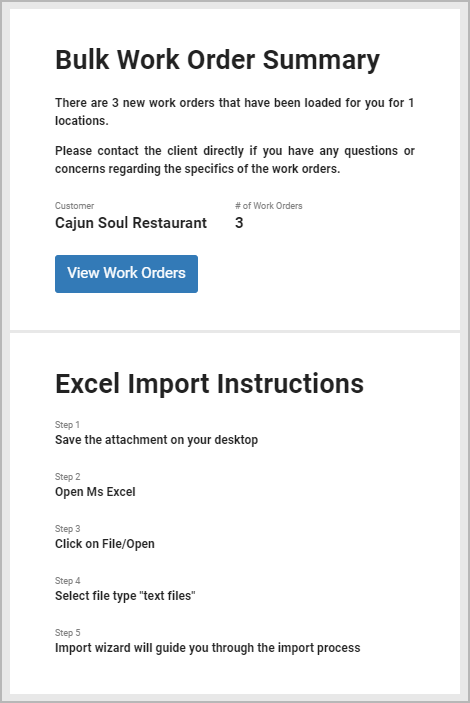
Planned Maintenance (PM) Work Orders are sent to your email as a bulk work order summary. So you cannot accept or decline them directly via email.
To accept/decline a PM work order, you need to manually change the work order status. The status change is carried out via adding a note. Click View Work Orders from the email to go to the Work Orders List.
The email attachment contains the details of the PM work orders dispatched to you. Follow the instructions in the email to import the .txt file to an .xlsx file.
Dial 1-516-500-7776. (International numbers and instructions are below.)
Enter IVR pin number followed by the pound sign(#).
Enter Work Order number followed by the pound sign.
Press zero (0) to accept service request. This will change the work order status from Open to In Progress/Dispatch Confirmed.
Dial 1-516-500-7776.
Enter IVR Pin number followed by the pound sign.
Enter Work Order number followed by the pound sign.
Decline the work order using one of the following prompts:
Press one (1) to Decline, because you don't service this location.
Press two (2) to Decline, because you don't service the trade.
Press three (3) to decline for any other reason.
Dialing Into the IVR System
You will hear the greeting.
You will be prompted to choose your language preference.
English is the default language. See IVR Language Support, below, to find the options for other languages.
You will be reminded to follow every entry / answer by pressing #.
You can speak to an Operator at anytime by pressing *.
You will be prompted to enter your Unique Pin Number.
You will be prompted to enter your Work Order Number. (Tracking Number, Work Order Number or Service ID Number can be used.)
Depending on the status and type of Work Order, you may be prompted to perform one or more of the following functions: Accept / Decline, Check-In or Check-Out. Select Accept or Decline. The work order changes to the In Progress status.
IVR Language Support
ServiceChannel's IVR system supports the following languages:
| English (Select Option 1) [default] | Turkish (Select Option 10) | Polish (Select Option 18) |
| Spanish (Select Option 2 or 9) | Portuguese (Select Option 11) | Hungarian (Select Option 19) |
| French (Select Option 3) | Korean (Select Option 12) | Romanian (Select Option 20) |
| German (Select Option 4) | Thai (Select Option 13) | Dutch (Select Option 21) |
| Italian (Select Option 5) | Tamil (Select Option 14) | Greek (Select Option 22) |
| Japanese (Select Option 6) | Russian (Select Option 15) | Arabic (Select Option 23) |
| Mandarin (Select Option 7) | Czech (Select Option 16) | |
| Cantonese (Select Option 8) | Hebrew (Select Option 17) |
IVR Toll-Free Numbers
(United States only) A unique, toll-free, number can be created upon request.
| Country | IVR Number | Country | IVR Number | |
|---|---|---|---|---|
Phone numbers marked with a † are NOT Toll Free numbers (additional charges may apply). You may incur charges by your local carrier. | ||||
United States † (continental) | 1-516-500-7776 1-516-200-3363 | Ireland | 1800817245 | |
| United States (Puerto Rico) | 1-877-322-4680 | Israel | 01801227258 | |
| Canada (continental) | (+1) 833-511-0025 | Italy | 800177856 | |
| Canada (NB, local) † | 1-506-300-3307 | Japan | 0120190431 | |
| Canada (ON, local) † | 1-647-496-1288 | Korea (South) | 003084910136 | |
| Luxembourg | 80027912 | |||
| Argentina | 08006663009 | Macau | 0800139 | |
| Australia | (+61) 1800316773 | Malaysia | 1800815571 | |
| Austria | 0800291875 | Mexico | 018002694559 | |
| Belgium | 080026062 | Netherlands | 08000221774 | |
| Belgium (national local) † | (+32) 3278483801 | New Zealand | 0800002396 | |
| Brazil | 08007618662 | Norway † | (+46) 020889819 (SE) (+44) 8081648944 (UK) (+48) 732070277 (PL) | |
| Chile | 0800914359 | Philippines | (+63) 1800-1-5500073 | |
| China (National) † | (+86) 04001203493 (+86) 04001203494 | Poland † | (+48) 732070277 (mobile) | |
| Colombia | 018005190644 | Portugal | 800180144 | |
| Croatia | 0800200353 | Romania | 0800476044 | |
| Czech Republic | 800500371 | Russian Federation | 88001009284 | |
| Denmark | 80826061 | Singapore | 8003211236 | |
| El Salvador (local) † | (+503) 21139437 | Spain | (+34) 900983426 | |
| France | (+33) 0805084237 | Sweden | (+46) 020889819 | |
| Germany | 08007241074 | Switzerland (Zurich, local) † | 0435080164 | |
| Greece | 8008481178 | Switzerland | 0800848810 | |
| Guatemala | (+502) 18008350525 | Taiwan | 00801148947 | |
| Honduras (local) † | (+504) 22170500 | Thailand | 001800132013893 | |
| Hong Kong | 800963942 | Turkey | 00800142032228 | |
| Hungary | 0680088171 | UAE | 8000320116 | |
| India | 0008001003497 | United Kingdom (London, local) † | (+44) 2038563939 | |
| United Kingdom | (+44) 8081648944 | |||